.png?width=150&height=26&name=indyauction%20Logo%20(Black).png)
View and update your pricing plan
Indy.auction provides transparent pricing tiers to ensure you have the right tools for your auction needs. You can review your current subscription and switch between plans directly from your seller account.
How to see your pricing plan
To view your active plan, follow these steps:
-
Log in to your Indy.auction seller account.
-
Navigate to the Dashboard.
- Click on the Pricing tab located on the left-hand side of the screen.
Your current plan will be clearly labelled at the top of the page.
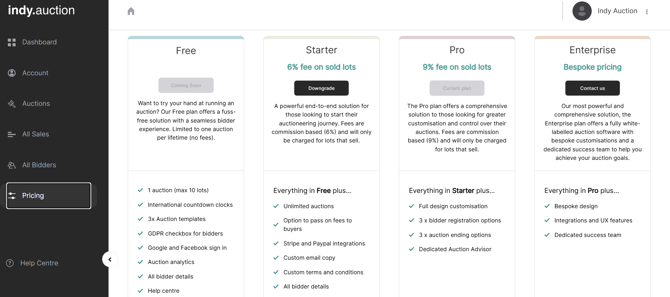 Pricing tab in the Indy.auction seller account.
How to change your pricing plan
-
Open the Pricing tab in your dashboard.
-
Review the features and commission structures for the available plan tiers.
-
Select the plan you want to change to.
-
Confirm your selection to apply the changes to your account.
For more information, please see our pricing page, or to find out more about these plans and speak to a member of our team, click here.