.png?width=150&height=26&name=indyauction%20Logo%20(Black).png)
Yes. Indy.auction includes an anti-snipe feature that sellers can enable when creating an auction. This feature helps ensure fair bidding by extending the auction end time if bids are placed close to closing.
How the anti-snipe feature works
When setting up an auction on Indy.auction, sellers can choose a bidding extension. This determines whether, and by how much, the auction end time is extended if a bid is placed in the final minute.
If a bidding extension is set, any bid placed during the last minute of the auction will automatically extend the closing time by the number of minutes you specify. This gives other bidders time to respond, rather than allowing the auction to end on a last-second bid.
If the bidding extension is set to 0 minutes, no anti-snipe feature applies, and the auction will close at the scheduled end time regardless of last-minute bids.
Where to set the anti-snipe feature
The bidding extension is configured during auction creation:
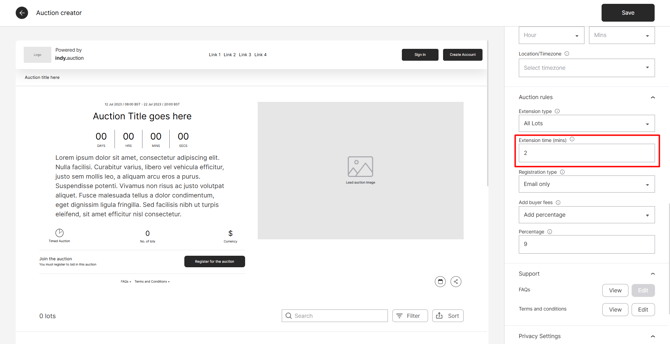
This setting applies to the entire auction and cannot be changed once the auction has gone live, so it is important to review it carefully before publishing.
How bidders see this information
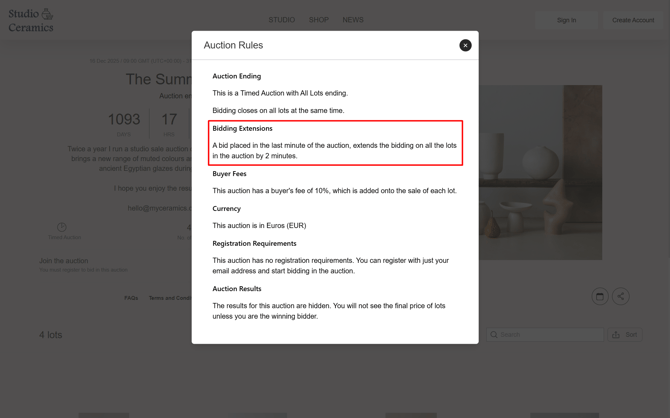
Once an auction is live, bidders can view whether a bidding extension is in place by checking the auction rules on the auction page.
On the auction page, bidders select Auction Rules to view the rules that apply to that auction.

Within the auction rules, bidders can see whether a bidding extension is active and how many minutes the auction will be extended if a bid is placed near the end.
What this means for sellers
Bidding extensions offer flexibility. You can choose to enable an anti-snipe feature to encourage competitive bidding at the close of an auction, or disable it by setting the extension to 0 minutes if a fixed end time is preferred.
For a detailed explanation of auction endings and bidding extensions, see Auction Endings and Bidding Extensions.